Connections between blocks
Connections are the mechanism that links your blocks together on the canvas. When you draw a link between two blocks, Fransys automatically injects the environment variables needed for communication between services.
How it works
- Drag a database or service block onto the canvas
- Draw a link between your application block and the service
- Done — Fransys generates and injects all variables automatically
No copy-pasting credentials, no .env file to maintain manually, no risk of inconsistency between services.
Automatically injected variables
Application → Database (PostgreSQL, MariaDB)
| Variable | Description |
|---|---|
DB_HOST | Internal address of the database service |
DB_PORT | Service port |
DB_DATABASE | Database name |
DB_USERNAME | Connection username |
DB_PASSWORD | Password (automatically generated) |
Application → Redis
| Variable | Description |
|---|---|
REDIS_HOST | Internal address of the Redis service |
REDIS_PORT | Service port |
REDIS_PASSWORD | Password (automatically generated) |
Application → Soketi
When you connect a Soketi block, Fransys injects the variables and lets you rename them to match your framework's convention. Each variable displays its original name and the new name on the application side:

| Original variable | Renamed to | Description |
|---|---|---|
SOCKET_HOST | PUSHER_HOST | WebSocket server address |
SOKETI_DEFAULT_APP_ID | PUSHER_APP_ID | Application identifier |
SOKETI_DEFAULT_APP_KEY | PUSHER_APP_KEY | Public key |
SOKETI_DEFAULT_APP_SECRET | PUSHER_APP_SECRET | Secret key |
This automatic renaming allows your Laravel application to directly use standard Pusher variables without any code adaptation.
Custom variables
In addition to automatically injected variables, you can add your own environment variables in the Environment variables tab of each block:
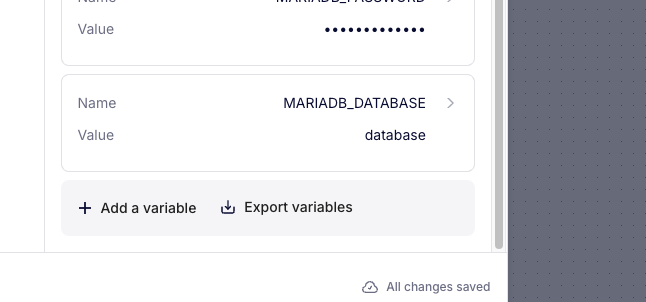
- Click + Add a variable to add a variable
- Define the Name and Value
- Click Export variables to export all variables in
.envformat
Passwords are hidden by default (displayed as ••••••••••) for security reasons.
Environment variable expansion
Fransys supports variable expansion: you can reference a variable inside another using the ${VARIABLE_NAME} syntax.
The most common example: database connection URLs. Rather than duplicating host, port, user, password, and database name values in a long connection string, you define each value once and compose your URL from these variables:
DATABASE_URL = postgres://${DB_USER}:${DB_PASSWORD}@${DB_HOST}:${DB_PORT}/${DB_NAME}
If the password changes, you modify it in one single place. No more copy-paste errors between variables and inconsistencies across environments.
Other expansion examples
# Full URL of an internal API
API_BASE_URL = https://${API_HOST}:${API_PORT}/api/v1

# Composed Redis URL
REDIS_URL = redis://:${REDIS_PASSWORD}@${REDIS_HOST}:${REDIS_PORT}/0

# Soketi configuration
BROADCAST_URL = ws://${SOKETI_HOST}:6001/app/${PUSHER_APP_KEY}
Variable expansion greatly simplifies managing your configurations. Define each value once, and compose complex variables from these elementary building blocks.
Best practices
- Connect your blocks on the canvas rather than manually entering variables — you benefit from automatic injection and synchronization.
- Use variable expansion for complex connection URLs — a single point of modification in case of change.
- Export your variables regularly to keep a record of your configuration.